Password manager with built-in 2FA…and a safe way to let your AI agents sign in.
Fills your password and your 2FA code on any login page. End-to-end encrypted. Free to start; sync across devices with Personal.
- AES-256-GCM on your device
- Master password never leaves it
- Open source
- AI agents only with your approval
No account required for the vault.
Sign in
Welcome back
EmailTeammates get the code, never the secret.
Every use through OTPilot's tools is logged. No tool returns a secret — a command you allow could still print one. Limits →
Share a 2FA code, not the secret.
Your team signs in to the shared account with a live code. Teammates never receive the 2FA secret: they can't copy it, export it or add it to another app. Remove someone and their access ends at once.
- Live codes for each teammate
- Stop sharing at any time; remove a teammate and their access ends at once.
- Code use shows in the team activity log (team owner): views, and copies as reported by the teammate's app.
Each shared secret is encrypted with a key split in two: OTPilot's server holds one half, each teammate's app the other. To make a code, the app sends its half; the server rebuilds the key, decrypts the secret, makes the code and discards both. So team 2FA codes are not end-to-end encrypted: our server sees the secret while it makes a code. Your personal vault, shared items and collections are end-to-end encrypted.
See it in action
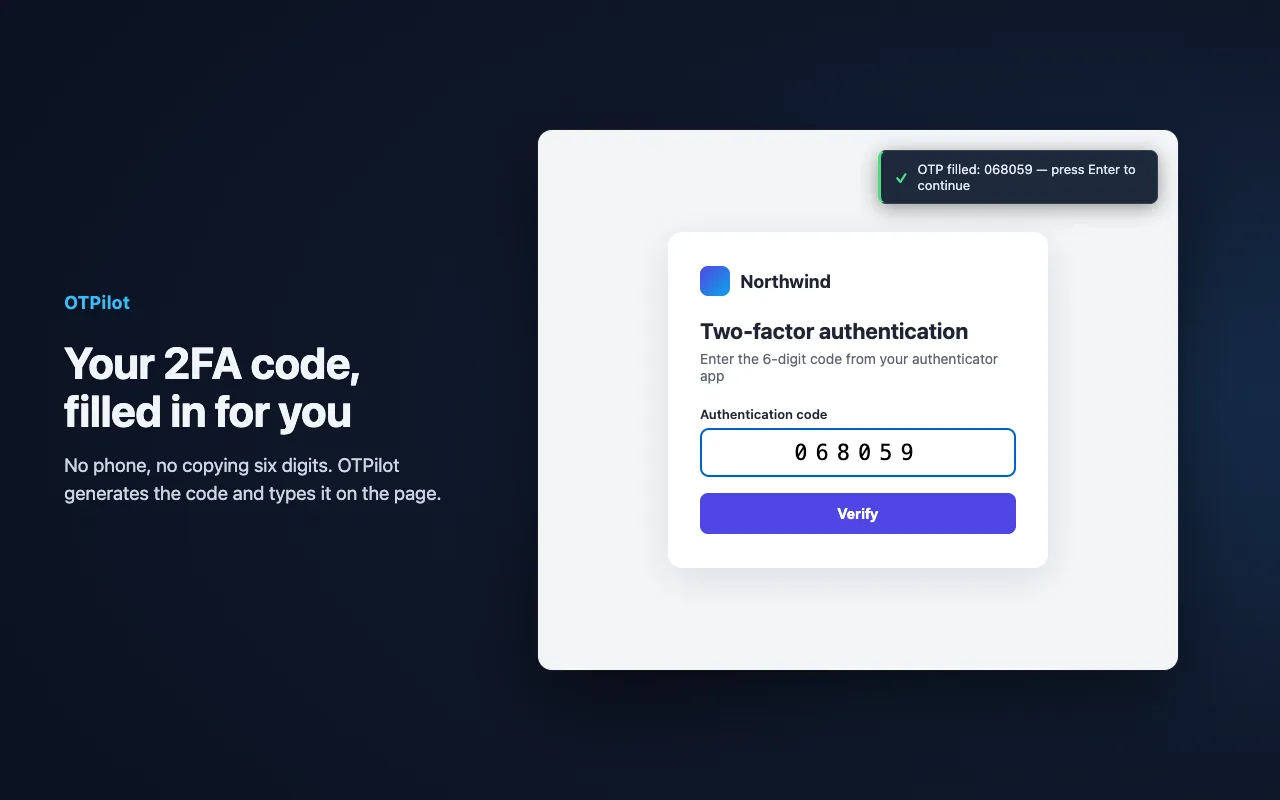
Your password, then your 2FA code, filled on the page. Everything else about the account one click away.



How OTPilot keeps you safe
Your vault is encrypted on your device with AES-256-GCM before it syncs. Here is what stays with you, what our server holds, and where the limits are.
On your device
- Your master password. It is never sent.
- Your vault key (also your recovery key), made on your device
- Your passwords, notes, 2FA secrets, keys and files, decrypted
- With a team plan, your sharing private key (ECDH P-256), kept under your vault key
On our server
Readable by us, besides the encrypted data we can't open:
- Your email, plan and Stripe customer id
- Your devices (name, OS, browser) and their sync logs
- Per encrypted item: id, revision, timestamps, whether it counts toward the Free limit, size
- Team name, members and roles, invites and share grants
- A shared 2FA code's account name and email
- The team activity log (who viewed or copied a team code, invites, removals)
- AI agents: name, machine and client, and the text of their requests
- What each agent did (the sites it signed in to, the programs it ran), and each grant's scope, expiry and allowed commands
- IP addresses, used for rate limiting
- The website domains we fetch icons for
How your keys fit together
Master password
Typed on your device, never sent
PBKDF2-SHA256
600,000 iterations
Vault key
Random, made on your device; the master password unlocks it
A key per item
Each item encrypted with AES-256-GCM before it syncs
AI agents: an agent gets a scoped copy of one item under a fresh key, wrapped to the agent's own ECDH P-256 key. Teams: collections and shared items have their own keys, wrapped to each teammate's ECDH P-256 key.
| Data | Our server can see | Our server can't see |
|---|---|---|
| Personal vault and syncEnd-to-end encrypted | Encrypted items, their ids, revisions, timestamps and sizes | Your passwords, notes, 2FA secrets, keys, files and item titles |
| Collections and item sharesEnd-to-end encrypted | Members, roles and grants | A collection's name and the items in it or shared |
| AI agent copiesEnd-to-end encrypted | The agent, which item it was given, the grant's scope, expiry and allowed commands, and the sites and programs it used | The copy itself: only the agent can open it |
| Master password and recovery keyNever sent | Nothing: they never leave your devices | Either of them |
| Team 2FA codes (2-of-2)Not end-to-end | The account name and email, who viewed or copied it, and the secret briefly each time it rebuilds it to make a code | A copy of our database alone can't rebuild the secret. Teammates get the code, never the secret. |
Team 2FA codes: the key is split in two halves, one wrapped to the teammate's device key and one on our server. To make each code the server rebuilds the secret briefly, so it is not end-to-end against a live server; it protects against a database leak.
AI agents: no tool returns a secret, but a command an agent runs could print one. Its output is scrubbed of the secrets it used (base64, hex, URL and JSON forms too), which is not a guarantee, and a sign-in leaves a session file in .otpilot/. An agent with its own shell on your machine can read the MCP's stored key and open the copies you granted, without a log entry.
Your AI agent can sign in. It is never handed the password.
Claude Code, Codex, Cursor or any MCP agent can log in to a site, pass the 2FA step and run commands with your credentials, using only the accounts you allow. Stop pasting secrets into chats.
- 1
Connect
Run npx -y @otpilot/mcp@latest connect --name "Claude Code". It starts with zero accounts.
- 2
Verify & approve
Compare the XXXX-XXXX code with the one in the extension, then approve the agent there.
- 3
Use
Allow it account by account. Every use through OTPilot's tools is logged, never a value.
- Per-account grants, revocable one by one
- Scopes: 2FA only, the whole sign-in, or chosen fields
- Expiry, or ask every time
- Command allowlist per account
- Sign-in only on the account's own site, over HTTPS (plain HTTP only for local addresses)
- Env vars for that command and what it starts
- Scrubbed output
- Activity log without values
- Revoke an agent or an account at any time
The honest limit
No OTPilot tool returns a secret. But an approved agent acts with its account, and a command it runs could print a secret: output is scrubbed (base64, hex, URL, JSON forms), which is not a guarantee. A sign-in leaves a session file in .otpilot/. An agent with its own shell on your machine can read the MCP's stored key and open the copies you granted, without a log entry. Only allow what you would trust the agent with.
Works with Claude Code, Codex, Cursor and any MCP client.
> Test the staging login and check the dashboard loads the payments● otpilot.list_accounts()⎿ GitHub (2FA, login) · AWS staging (2FA, login) · acme-db (password)● otpilot.browser_login(account: "AWS staging")⎿ pending_approval — approve "Claude Code → AWS staging" in OTPilotI need access to AWS staging. Approve it in OTPilot and I'll continue.● otpilot.browser_login(account: "AWS staging")⎿ signed_in — session saved to .otpilot/aws-staging.json (expires 1h)● playwright.open("https://staging.acme.io/payments",storageState: ".otpilot/aws-staging.json")⎿ 200 · 14 payments listed● otpilot.run("psql -h db.staging -c 'select count(*) from payments'",env: { PGPASSWORD: "acme-db/password" })⎿ count: 14 (secrets redacted from output)Done: the staging login works and the dashboard shows all 14 payments.I never saw the password or the 2FA code.
Everything you need, nothing you don't
Built for developers and teams who take security seriously but hate friction.
Passwords and 2FA, filled together
OTPilot fills your login and then the 2FA code, offers to save new passwords, and suggests strong ones on sign-up forms. No copy-pasting.
End-to-end encrypted sync
Every password, note and 2FA secret is encrypted on your device. The key lives only with you — our servers never see your vault's contents.
Secure team sharing
Share collections of passwords with view or edit access, or just a live 2FA code without exposing its secret. Stop sharing at any time.
Works locally, always
Free covers unlimited 2FA codes and 50 passwords or notes, works offline. Import from your old password manager in a click.
Open source
The extension is GPL-3.0 and the API is AGPL-3.0. Read the code on GitHub, audit it, trust it.
Auto-detect 2FA setup
OTPilot scans QR codes on setup pages and offers to save the account automatically. No manual entry.
Email codes, filled too
Waiting for a code by email? OTPilot reads it from an open Gmail, Outlook, Yahoo Mail, Proton Mail, Fastmail or Zoho Mail tab and fills it in. Processed only on your device.
Several accounts on one site
Work and personal, staging and production: OTPilot finds every matching account and lets you pick the right one in one click.
Unlock right on the page
Vault locked? Type your master password in the prompt on the page and OTPilot unlocks and fills, without opening the popup.
More than passwords
Secure notes, servers, API keys, SSH keys and files (.env, .p8), with your own fields grouped in sections. Link related items to an account and find everything in one place.
Switch from Google Authenticator
Screenshot its "Transfer accounts" QR codes and select them to import its time-based 2FA codes, decoded on your device. Passwords import from a CSV.
Every device under control
See each connected browser and its sync history, disconnect it or wipe it remotely, and get an email when a new one connects.
Up and running in 60 seconds
No complex setup. No sync accounts to create. Just install and go.
Install the extension
Add OTPilot to Chrome in one click. No account, no setup — works immediately.
Bring your passwords and 2FA
Import from Chrome, 1Password, Bitwarden or LastPass, save logins as you sign in, and let OTPilot catch 2FA QR codes on setup pages.
Log in anywhere, faster
OTPilot fills your password, then the 2FA code when it's asked for. No switching apps, no copy-pasting.
Simple, honest pricing
Start free. Upgrade when you need more.
Free
forever
A complete vault for one browser, stored locally.
- Unlimited 2FA codes
- Up to 50 passwords, notes & other items
- Auto-fill passwords and 2FA codes
- Password generator
- Email code auto-fill
- Import from other password managers
- Master password lock
- AI agents: 1 agent, up to 3 accountsNEW
Personal
per month
Your whole vault, synced across every browser and device. Free for 30 days, no card.
- Everything in Free
- Unlimited passwords, notes & items
- End-to-end encrypted sync
- Multi-device, multi-browser
- Cloud backup
- Unlimited AI agents and accountsNEW
- Cancel anytime
Team Lite
per workspace / month
Shared passwords and 2FA for small teams and startups.
- Everything in Personal
- 5 seats included
- Shared collections (end-to-end encrypted)
- Share a 2FA code without revealing its secret
- View / edit / manage permissions
- Invite & revoke access instantly
- Unlimited AI agents for every memberNEW
- +$2 / extra seat / month
Paid plans renew automatically and can be cancelled anytime. 14-day refund window for technical issues. Refund policy →
Frequently asked questions
Yes. The extension is fully functional without creating an account: passwords, notes, 2FA codes and auto-fill all work locally in your browser. Cloud sync is an optional paid feature.
No. Every item in your vault is encrypted on your device, each with its own key, protected by your master password. Synced items reach our servers only as ciphertext; the key to read them never leaves your devices. Your master password is never sent anywhere.
Unlimited 2FA codes, plus up to 50 other items (passwords, secure notes, servers, API credentials) on one browser, with auto-fill, the password generator and imports from other password managers. A login that only holds a 2FA code (and its username) never counts toward the 50. Personal removes the limit and syncs everything across your devices.
Yes, without ever seeing them. Connect Claude Code, Codex, Cursor or any MCP agent, approve it in the extension, and allow it the accounts it may use, one by one. The agent asks OTPilot to sign in or run a command; OTPilot uses the password and 2FA code itself and returns only the result. Free covers 1 agent with up to 3 accounts; Personal and Team are unlimited.
Yes. A new account gets 30 days of Personal free, with no card: sync your whole vault across every browser while it lasts. An account created earlier on the free plan can start the same trial from the billing page or the extension's Sync view, once. When it ends you go back to Free and nothing is deleted. Subscribing with more than two days of the trial left keeps them free: the first charge comes when the trial would have ended.
Personal is $3/month or $30/year; Team Lite is $8/month or $80/year per workspace. Plans renew automatically and you can cancel anytime from the billing page; you keep the plan until the end of the period you paid for. After that your vault stays on your devices, on the free plan: if you have more than 50 items you keep all of them, you just can't add new ones until you're back under the limit or upgrade again.
Yes. Export a CSV from Chrome, Edge, Brave, Firefox, Bitwarden, 1Password, LastPass, Dashlane or KeePass and import it in the extension's Settings. If you already have a site's 2FA code in OTPilot, the imported password is added to that same login. You can also export your whole vault as CSV at any time.
Two ways. Collections share everything (passwords, notes, 2FA) with the teammates you choose, end-to-end encrypted: each member gets the collection key wrapped to their own device key, so our servers never see the content. Members can view, edit or manage a collection. Or share just a live 2FA code: the key that protects the secret is split in two halves, one wrapped to the teammate's device key and one on our server, and the teammate only ever gets the current 6-digit code, never the secret. See "How does team 2FA sharing work?" for what that does and doesn't protect.
The secret is encrypted with a key, and that key is split in two halves: one wrapped to the teammate's device key, the other kept on our server. Teammates get the live code, never the secret: they can't copy it, export it or add it to another app. To make each code the app sends its half, the server rebuilds the key, decrypts the secret for a moment, makes the code and discards both. So team 2FA codes are not end-to-end encrypted: our server sees the secret while it makes a code. The split protects against a database leak. Code use shows in the team activity log (team owner): views, and copies as reported by the teammate's app. Stop sharing at any time; remove a teammate and their access ends at once. Your personal vault, shared items, collections and agent copies are end-to-end encrypted.
An agent talks to the OTPilot MCP server on your computer, and no tool returns a secret. It asks OTPilot to sign in or run a command; OTPilot uses the password and 2FA code itself. Each allowed account is encrypted end-to-end for that agent's own key, a sign-in works only on the account's own site over HTTPS (plain HTTP only for local addresses), and a command gets its secrets as environment variables, with the output scrubbed.
Yes. A new agent starts with zero accounts and you approve it in the extension after comparing its XXXX-XXXX code. Then you allow accounts one by one, each with a scope (2FA code only, the whole sign-in, or chosen fields), an expiry or "ask every time", and a command allowlist. You can revoke an agent or a single account at any time.
Yes. Every use through OTPilot's tools is logged in the extension's Agents view: which agent, which account and what it did, never a value.
An approved agent acts with its account, so only allow what you would trust it with. A command an agent runs could print a secret on purpose: output is scrubbed (base64, hex, URL and JSON forms), which is not a guarantee. A sign-in leaves a session file in .otpilot/ on your computer. An agent with its own shell on your machine can read the MCP's stored key and open the copies you granted, without a log entry. And nothing protects a compromised machine.
You lose access to what was shared with you: the team's collections and shared codes. Your own vault is never touched. If you also pay for Personal you go back to it; otherwise you go back to the free plan, keeping all your items.
Yes. The extension is GPL v3 and the backend is AGPL v3 — both OSI-approved open source licenses. You can read, audit, and fork every line. The copyleft terms mean that anyone who distributes a modified version must also keep it open source under the same license.
Yes, within 14 days of a payment (for yearly plans, of the first purchase; renewals are not refunded), if the service didn't work as documented or there was a billing error. We don't offer refunds for "changed my mind", but you can cancel anytime and the free plan lets you try everything first.
OTPilot is available on Chrome and Edge. Firefox and Safari support is coming soon.
Yes. On the free plan you can move your logins and 2FA codes between devices manually with the encrypted backup (export on one browser, import on another). CSV export and import can also move your secure notes. CSV exports include servers and API credentials too, but OTPilot cannot yet import those items back from CSV. Automatic, real-time sync of everything is part of the Personal plan.
Yes. Google Authenticator has a built-in "Transfer accounts" export that generates one or more QR codes. Screenshot them and select the images in OTPilot's Settings — your accounts are imported instantly, no retyping secrets. Everything is decoded locally on your device.